Mixture Supplementary Labels
This topic is intended for Independent pharmacies only and is not applicable to Rexall pharmacies.
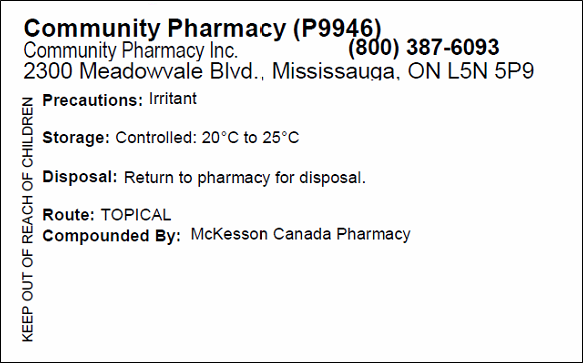
A supplementary label can be printed for mixture prescriptions to comply with labelling requirements set out by NAPRA for non-sterile compounding. Information on the supplementary label is pre-populated based on information entered in the Mixture Folder Master Formulation Record.
Setting the Number of Supplementary Labels for a Prescription
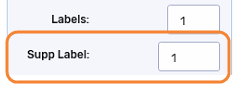
By default, one supplementary label prints per Vial label. However, the number of supplementary labels can be customized per prescription in Rx Detail.
To set the number of supplementary labels in Rx Detail:
-
Process the prescription until it reaches Rx Detail.
-
In the Supp Label field, enter the number of supplementary labels you want to print. You cannot enter a value that is greater than the number of vial copies.
-
Continue filling the prescription as per usual process.
Entering Information for the Supplementary Label
The supplementary label includes the following information entered in the Mixture Folder:
-
Precautions
-
Storage
-
Disposal
-
Route
-
Compounded By
-
Additional Ingredient Instructions Note
To enter the information that pre-populates on the supplementary label:
-
Open the Mixture Folder.
-
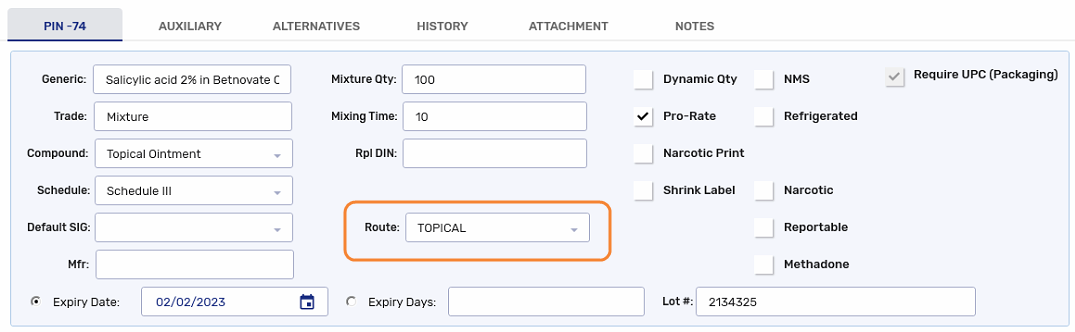
In the Route field, select the route that the mixture will be given.
-
Select the Master Formula button. The Master Formula window opens.
-
Enter the following information:
-
Compounding Pharmacy - this information appears in the Compounded By field of the label.

-
Stability and Storage Conditions - this information appears on the Storage field of the label.

-
Special Precautions - this information appears on the Precautions field of the label.

-
Disposal Instructions for Patients - this information appears on the Disposal field of the label.

-
Additional Instruction Label - this information appears below the Compounded By field of the label, if any are entered.

-
-
Select OK.
-
Select Save.